

Share this article:
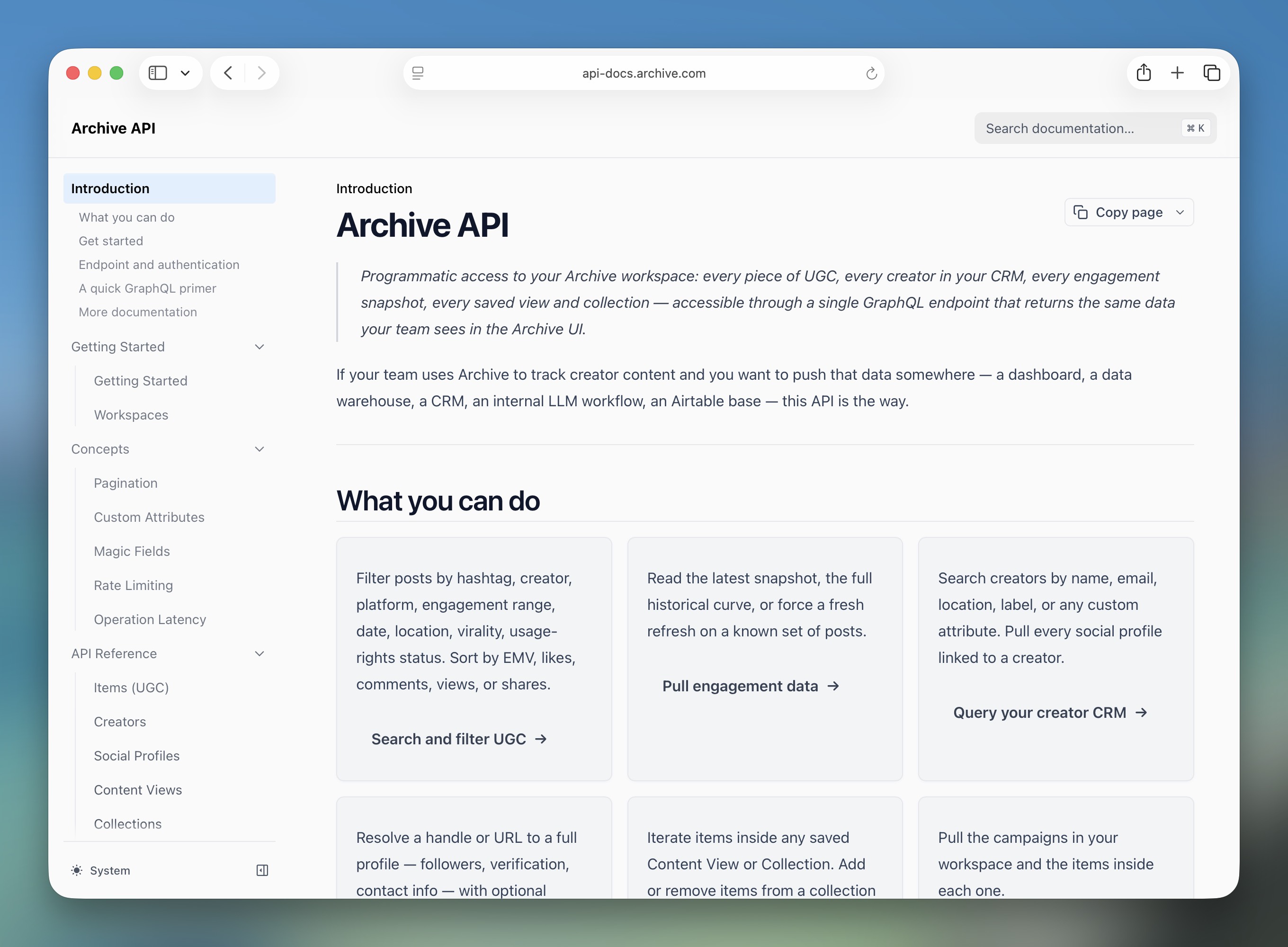
Archive now gives your teams direct, programmatic access to your workspace data, including creators, social profiles, UGC, engagement history, and collections, so you can build the integrations and reporting workflows your business needs.
The Archive UI is built for influencer and social teams. But the data it captures from every tagged post, every engagement metric, and every creator attribute is useful well beyond a single dashboard.
Teams want to pull UGC performance into their BI stack, sync creator records into their CRM, or run custom queries against engagement history the UI doesn't surface. Until now, the answer was a CSV export and a lot of manual work. The Archive API changes that. It's queryable, filterable, and ready to connect to whatever tools you already use.
How it works
The API uses GraphQL: you describe exactly what data you want and get back only those fields, including nested data like a creator's social profiles and engagement metrics in a single request. All requests go to `POST https://app.archive.com/api/v2`.
What you can query
Creators: Query creators by name, email, or custom attributes. Retrieve profiles alongside their social handles and engagement data in a single request.
Social profiles: Look up social accounts by handle, ID, or URL across Instagram, TikTok, and YouTube. Fetch fresh platform data on demand.
Items (UGC): Search, filter, and sort captured content such as posts, reels, stories, and videos. Access captions, engagement metrics, and media files.
Engagement history: Pull time-series engagement data for any item. You can see likes, views, comments, shares, EMV, and virality score tracked over time.
Content views: Access your saved Content Views from Social Listening. Query items within any view, including Magic Fields-filtered views.
Collections: Manage collections programmatically, add and remove items, move content from views into collections, and build automated content pipelines.
Here's how teams are using it today
With Archive's API, you can pull every piece of UGC Archive captures, along with Archive's AI classifications for product, category, and sentiment, directly into the systems your team already uses.
We're already seeing customers like Ketone IQ pipe creator and UGC data into tools like Airtable to build custom reporting workflows their teams use day-to-day.
Our API is also helping teams:
Export data to Google Sheets, Airtable, or a data warehouse
Query creators or UGC items with the fields you need like follower count, EMV, caption, and post date, and pipe the results directly into your reporting stack. The API paginates automatically so you can pull full datasets, not just the first page.
Build automated performance reports
Pull engagement history for every item in a Content View or Collection and track how likes, views, and EMV grow over time. Useful for campaign recaps and ongoing creator performance analysis without manual exports.
Sync creator data into your CRM
Query creators and their social profiles, then push records into your CRM or internal tooling. The Custom Attributes your team manages in Archive are fully accessible via the API so nothing gets lost in translation.
Look up content by URL
If your team tracks posts in spreadsheets by URL, use the API to translate those URLs into Archive item IDs and pull engagement data programmatically. Supports Instagram, TikTok, and YouTube links.
Move content from views into collections at scale
Programmatically move all items from a Magic Fields-filtered Content View into a Collection to help you prepare reports or feed content into workflows that require a collection. Tested with 14,000+ items.
Using the API with Claude
Every workflow in the API documentation includes plain-language prompts you can use with Claude directly. Set up the API System Prompt in your Archive workspace and ask Claude to run queries for you. Just describe what you want, and Claude handles the query construction, pagination, and data formatting.
For example: If you enter, "Export all creators with their name, email, Instagram handle, and follower count as a CSV", Claude queries the API, paginates through all results, and generates a file you can download.
Getting started
API access is available on select Archive plans. If your plan includes it, generate a token directly from Settings → API in the Archive app.
Full documentation including authentication setup, query reference, and common workflows is at api-docs.archive.com.
If you're not sure whether your plan includes API access, your Customer Success Manager can help.

Ready to stop running creator marketing manually?
In just 30 minutes, we’ll show you how Archive helps you track everything, automate the manual work, and prove what’s really working on social.
Book a Demo


